
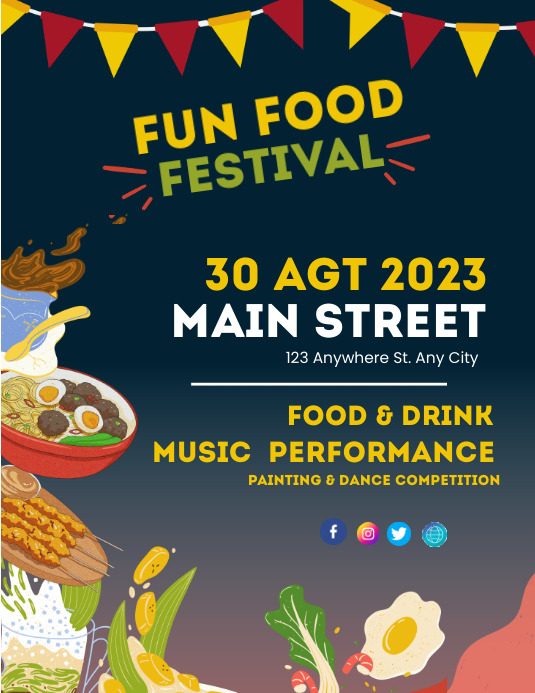
Whether you own a food truck, a restaurant, or are trying out new types of delivery promos, fast-food posters are your best bet at effective marketing. The best part? With online design tools, this task is easier than ever. Take a basic food photo and turn into a professional promotional ad in minutes using free fast food poster templates.
In this blog post, we will delve into a list of 5 online tools that can help you achieve tasty, attention-grabbing, and professionally-made posters. We will discuss pros and cons of each tool and features they offer to its beginners.
- Canva
Canva is one of the top choices for beginners at design because it makes graphic designing easy and accessible. The template library is wide with thousands of user-designed templates for almost any food-related niches. The editor is simple enough to navigate and you get access to layouts for all forms of online and offline media (posters, flyers, menus, stories, ads, and more).
Works best for
- Complete beginners
- Restaurants that offer frequent promotions
- Teams that need collaborative features
Key features
- Suite of AI tools (Magic writer, background remover, image generator)
- Stock images, illustrations, and stickers
- Brand kits (available in Canva Pro only)
- Resize tool for cross-platform posting
- Fast-food themed poster templates
- Simplified drag-and-drop editor
Pricing
- Free
- Canva Pro: $12.99/month
- Canva Teams: $14.99/month
Pros and Cons
| Pros | Cons |
| ✅ Template library is user-created and offers a variety of layouts and themes | ❌ Best templates, elements, fonts, and images are locked behind Canva Pro |
| ✅ Extremely beginner-friendly and easy to learn for first-time designers | ❌ Advanced customization is limited |
| ✅There is a good balance between design features and AI-powered tools |
- LightX
LightX is a great option for small businesses who are leaning into AI image editing. If you want to edit your food images or fix lighting, this tool has photo enhancement tools to make your design process fairly simple.
Works best for
- Food trucks, cafes, and home-based food businesses
- Individuals who need advanced editing controls
- Entrepreneurs who prioritise poster design alongside image enhancement
Key features
- AI background remover for subject isolation
- AI photo enhancement
- Layer-based editing and formatting options
- Video editing
- Customizable poster templates
Pricing
- Free
- Pro: $4.99/month (HD exports, full AI suite, no watermark)
- Pro Annual: $35/year (Offers same features as Pro but at a cheaper rate)
Pros and Cons
| Pros | Cons |
| ✅ Good option for improving low-quality or cluttered food images | ❌ Fewer templates than other tools such as Canva or PosterMyWall |
| ✅ Easy-to-navigate editor and website interface | ❌ Free plan limits freedom in creating unique poster designs |
| ✅ Strong suite of editing features for a lower price | |
| ✅ Large template library with various themes of templates |
- Fotor
If you have pre-existing food images or photography, Fotor is definitely the best fit for your fast-food business. You can use simple AI tools to enhance images or edit elements for your posters in minutes. This tool is flexible, supports multiple design formats, and fairly beginner-friendly
Works best for
- Restaurant owners with existing food photography and marketing visuals
- Beginners who require simple yet efficient design tools
- Teams who need omnichannel posting options
Key features
- Quick photo retouching
- Fast-food related poster templates
- Basic drag-and-drop editor
- AI image enhancer
- Cross-platform editing and sharing
Pricing
- Free
- Pro: $7.49/month
Pros and Cons
| Pros | Cons |
| ✅ Variety of image enhancement and retouching features | ❌ Template library is limited and you may not find relevant and appropriately themed layouts |
| ✅ Editor is simple to use and beginner-friendly | ❌ Gallery of stock photos is smaller than other tools on this list |
| ✅Offers features which streamline multi-channel posting |
- Snappa
Snappa’s interface is created with principles of ease and simplicity in mind. If you want to create fast-food related banners, flyers, or social-media visuals, Snappa enables you to create your own posters with quick turnarounds. There is no need to get stuck in complicated design options, this platform is completely beginner-friendly.
Works best for
- Small restaurants who emphasize social media marketing
- Frequent banner and flyer creation and repurposing
- Businesses that do not have original food photography
Key features
- Large library of stock photos to use for poster-making
- Preset sizes to choose from (for ads, social media posts, and flyers)
- Background remover (for subject isolation)
- Simple editor for quick designs
- Clean and minimalist layout templates
Pricing
- Free
- Pro: $15/month (billed monthly) and $10/month (billed yearly)
- Team (up to 5 users): $30/month
Pros and Cons
| Pros | Cons |
| ✅ Easy-to-use user interface | ❌ Free plan limits monthly downloads |
| ✅ Great for large and quick poster batches | ❌ Not ideal for designs that are complex |
| ✅ Excellent fit for those who rely on stock photos for poster design |
- PosterMyWall
PosterMyWall is a one-stop solution for your marketing and design needs. With a wide library of over 2 million templates and brand tools, this platform offers users more than just a design platform.
Works best for
- Businesses needing both digital and print materials
- Designers who want marketing and design features in one place
- Beginners designing for the first time
Key features
- Large fast-food themed template library
- AI writer for poster copies and text generation
- Drag-and-drop editor
- Content planner
- Brand kits for consistency
- Email marketing tools
Pricing
- Free
- Premium: $9.95/month or $99.95/year
- Team (2-5 users): $14.95/month
- Team (6-10 users): $35.95/month
Pros and Cons
| Pros | Cons |
| ✅ Large template library with many themed options | ❌ Advanced layer/element control |
| ✅ Offers automation for marketing and content-planning | ❌ Some features required PosterMyWall’s premium plan |
| ✅Great for beginners who are learning designing for the first time |
How to Maximise Your Fast-Food Poster’s Impact?
An impactful poster is a must for effective marketing. Below are quick tips you can use to boost customer engagement.
- Pick the right template: Always start with a layout that matches your restaurant’s theme.
- Use AI tools: Features like background removal, image enhancement, and copy suggestions can save you time and money.
- Plan for multi-channel posting: Resize your posters to turn them into flyers, banners, and social media posts without having to redesign your graphics from scratch.
- Maintain brand cohesion: By using brand kits, you can make sure that your designs stay uniform and consistent regardless of where you post them.
FAQs
Here are some frequently asked questions about the best online tools for fast-food posters.
- I don’t have a professional food photographer. Can I still make a professional-looking poster?
Yes, of course. With tools like Snappa and Fotor, you can access huge libraries of high-resolution stock images. You can also use PosterMyWall’s AI image generator to create unique artworks and include your brand’s visual identity into your poster designs.
- Which tool should I pick if I want to design more than just posters?
PosterMyWall would be a good pick for you. This online tool is focused on small business’ marketing needs, spanning from tools that help in graphic designing to social-media planning and content scheduling. It is ideal for restaurants or fast-food brands that want to maintain a cohesive brand identity across online and offline marketing channels.

More Stories
Spice Up Your Plate: Unexpected Culinary Adventures in 10-Minute Recipes
The Secret Lives of Leftovers: How Your Meal Lives On
The Future of Food: 10 Bold Trends Revolutionizing What We Eat Next